Thursday, August 21, 2008

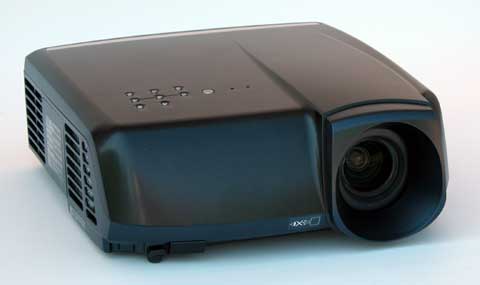
Mitsubishi HC5500


by Evan Powell

Price as reviewed $2,495

Specifications

ANSI lumens: 1200

Contrast (full on/off): 14,000:1

Light Engine: 1920x1080, native 16:9, 0.74" three-panel inorganic LCD, Micro Lens, with 160W UHP lamp.

Video Compatibility: 1080p/60/50/24, 1080i, 720p, 576p, 576i, 480p, 480i.

Data Compatibility: Computer resolutions up to UXGA 1600x1200

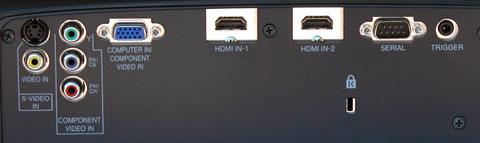
Connection Panel: Two HDMI v. 1.3, one 15-pin VGA, one 3-RCA component input, one s-video, one composite, one 12V trigger, one 9-pin DSub serial port.

Lens and Throw Distance: 1.2:1 power zoom/focus lens with vertical powered lens shift. Throws a 120" diagonal 16:9 image from 12.5 to 15.25 feet

Lamp Life: 2,000 hours, 5,000 hours in eco-mode

Replacement lamp cost: $459 retail

Warranty: Two years. Lamp warranty One Year or 500 hours, whichever comes first.

HC5500 vs. HC4900

Though the HC5500 will replace the HC4900 as Mitsubishi's least expensive 1080p model, it offers a variety of features found on more expensive home theater projectors. Key improvements in the HC5500 over the HC4900 are the following:

• Higher contrast. The HC4900 was rated at 7500:1, and the HC5500 is rated at 14,000:1. In viewing this two units side by side, the HC5500 has an obvious edge in contrast, and an even more obvious advantage in black levels.

• Higher brightness. The HC4900 was rated at 1000 ANSI lumens maximum, and the HC5500 is rated at 1200.

• Much faster auto iris. On the HC4900, with a shift in scenes from bright to dark it would take the auto iris a second or two to adjust to the maximum black level. On the HC5500, the iris adjustment happens so quickly that it is invisible.

• HDMI inputs. The DVI port on the HC4900 has been converted to a second HDMI input. Thus, there are two HDMI 1.3 inputs on the HC5500, whereas there was just one HDMI 1.2 input on the HC4900.

• Improved video processing. The Pixelworks processor on the HC4900 has been upgraded to the Silicon Optics HQV chip.

• 1080p/24. The 4900 did not have 1080p/24 capability, and the HC5500 does.

• Anamorphic lens compatibility. The HC5500 has a versatile scaling package that allows the user to install an anamorphic lens and leave it permanently in place no matter what aspect ratio the subject matter is in. This saves the cost of a motorized track, which can be substantial, or it eliminates the need to manually move the lens when one switches from 2.35 to non-2.35 material. Either way, it provides a friendlier solution for those interested in super-widescreen 2.35 installations.

• Digital keystone correction. A +/- 15 degrees vertical keystone correction capability has been added to the HC5500 that did not exist on the HC4900.

• Fan noise. The HC5500 is purported to be a bit quieter than the HC4900. It might be--we can't tell because the HC4900 was already stone quiet, so we don't notice any difference. These are two of the quietest home theater projectors on the market.

Limitations

The HC5500 has one noteworthy reduction in functionality as compared to its predecessor: the zoom range on the lens has been reduced from 1.6x to 1.2x, and the vertical lens shift range has been reduced from 2.5 picture heights to 2.0 picture heights. Horizontal lens shift, which had a modest range of 5% of the picture width on the HC4900, has been eliminated on the new model.

The new zoom lens and lens shift ranges introduce some restrictions on how and where you can install the HC5500. As is typical, with the lens in neutral position, the centerline of the lens intersects the center of the projected image. From that point you can use vertical lens shift to raise or lower the picture a maximum of 50% of the picture height. That means you can place the image entirely above or below the centerline of the lens, but without any additional clearance. This is great for mounting the projector on a rear shelf or on a bookcase or stand directly behind the seats. On the other hand, for a ceiling mount you may need to use a drop extension tube to avoid tilting the projector to hit the screen.

The short zoom range means that the projector will almost always be placed immediately behind the seats if it is not ceiling mounted. If, for example, you want to install a 120" 16:9 screen, you will need to place the HC5500 at least 12.5' and no more than about 15.25' from the screen. The HC4900 had the same minimum throw distance of 12.5 feet for this screen size, but it could be set back almost 20 feet if your room dimensions required it.

The HC5500's short zoom range means that the projector will be placed at a distance of between 1.4 and 1.7 times the screen width. Since many people prefer to sit at this viewing range, or perhaps just a bit closer, the projector will most likely end up immediately behind the seats in many installations. Thankfully, the projector is so quiet you'll never know it's there. As always, before you place an order, take care to measure out your room dimensions and screen size to ensure that the projector's geometry will fit your intended installation plan.

Performance Notes

Lumen readings. In its video optimized configuration with lens at its widest angle, gamma mode set to Cinema and color temperature on Warm, we measured our HC5500 test unit at 610 ANSI lumens, compared to 560 on the HC4900. Thus, on our test units we measure an incremental boost in brightness of about 9%.

Low Lamp mode reduces light output in all operating modes by 26%, and improves lamp life from 2000 to 5000 hours. Since the replacement lamp is $459, users who put a lot of hours on their projectors will find the ability to stretch life out to 5000 hours a desirable option.

Since the zoom lens is only 1.2x, the change in lumen output between its wide angle and telephoto setting is inconsequential. Moving from wide angle to telephoto reduces lumen output by about 5%.

ANSI contrast measured 260:1, which is consistent with what we have been measuring for other LCD projectors in the 1080p performance class.

Conclusion

Last December, we gave the HC4900 our Editor's Choice Award for outstanding value in 1080p projection. Now, just seven months later, the HC5500 represents a substantial improvement in image quality over its predecessor. It is not selling below $2,000 like the HC4900 was, but it is still aggressively priced at an estimated street of $2,495. Higher contrast, deeper blacks, upgraded video processing, 1080p/24 compatibility, and a much faster auto iris combine to make the HC5500 a significant step forward in 1080p projection at this price level. We will wait to see how the market develops in 1080p projection before designating this year's Editor's Choice Awards, but the HC5500 must be considered as a strong contender no matter what happens.

Beyond the improved image quality, the flexible scaling to accommodate a permanently deployed anamorphic lens makes the HC5500 a very attractive option for those looking for a cost-effective 2.35 Cinemascope installation. Thus far, this feature has been seen only on 1080p models that are much higher in price. For more information about 2.35 widescreen installation and whether it is right for you, read this article.

Mitsubishi continues to make competitive inroads into the hot 1080p home theater market with its evolving line of 1080p models that are all outstanding value propositions. As with the HC4900 and HC5000 before it, the HC5500 is highly recommended.

[+/-] Read moore...

Sanyo PLV-Z2000


Price as reviewed $2,155.00 - $2,550.99

Product summary

The good: Accurate color decoding; independent memory per input; comprehensive connectivity; includes both horizontal and vertical lens shift.

The bad: Primary and secondary color accuracy is way off, particularly red and green.

The bottom line: While Sanyo's PLV-Z2000 1080p projector does have some performance shortcomings, it's nonetheless a very good value.

Specs: Projector type: LCD projector; Resolution: 1920 x 1080; Image brightness: 1200 ANSI lumens

by Kevin Miller

Both front projectors and flat-panel HDTVs are plummeting in price while offering more and more in the way of features and performance. Sanyo's LCD-based PLV-Z2000, is an extremely well-priced, 1080p resolution projector that delivers reasonably good performance for the dollar. It has a solid feature package for setup and fine tuning of the picture, and also offers comprehensive connectivity. Its flaws in picture quality, while notable, are generally shared by most front-projection systems, particularly in the sub-$10,000 price range.

Design
The Sanyo PLV-Z2000's outward appearance belies the fact that little or no effort or money was invested in its physical design to make it attractive in any way. It's basically a squarish box with a relatively small footprint, and our review sample was finished in white. Both the intake and outtake vents for cooling are located on the right side of the chassis when in a floor-mounted configuration, or on the left if ceiling-mounted. The unit does sport a cool electronic trap door that opens automatically when it is turned on and closes when powered down. All told, the projector measures 15.8 by 5.8 by 13.6 inches and weighs 16 pounds.

The remote control is an intelligent design and is relatively intuitive and easy to use. It has direct access keys for all inputs and picture controls. Thankfully, it is also fully backlit with the touch of a button on the upper-left side. Internally, the menu system is quite simple and straightforward to use.

Features
As we mentioned earlier, the Sanyo PLV-Z2000 has a native resolution of 1080p, which translates to 1,920x1,080 pixels available to produce a picture. That's especially important in a projector, because the big screen size makes the benefits of 1080p more apparent.

Like many projectors, the PLV-Z2000 has a few picture-affecting features that are best left turned off, as they keep the projector from delivering its best performance. These include Auto Black Stretch, which automatically changes the black level depending on the content of the picture; Contrast Enhancement, which simply lowers the black; Transient Improvement, which appears to do nothing at all; and Dynamic Gamma, which we take to mean gamma that changes on the fly. Finally, there is a complex Color Management System, but it actually doesn't work well at all. You can improve primary color accuracy, but it ruins color decoding, which is a problem we have seen before. All of these features are located in the Advanced menu on the second page of the Image Adjust menu.

With that said, Sanyo does offer a few features that actually help in setup as well as the fine-tuning of the picture. Topping our favorites list here is the inclusion of both horizontal and vertical lens shift, which greatly eases the difficulty of the physical installation of the projector relative to the screen. The PLV-Z2000 has perhaps too many picture modes. We chose Natural as it was the only one that didn't negatively effect color decoding; the others seemed to introduce red push.

Selectable color temperatures are, of course, available and include Default, Low 1, Low 2, High 1, High 2, and User, the last of which appears if you use the three grayscale controls to adjust the color of gray. There are four settings for the amplitude of the lamp, while the Iris, which attenuates the lamp output, has a Normal and a Fast setting in addition to offering a fixed mode with a range from -63 to 0. We left ours at -30, which is the default setting for Natural.

Connection options on the PLV-Z2000 are fairly generous for a front projector. Two HDMI inputs are the most important, and they both support the HDMI 1.3 specification. There are also two component-video inputs, an S-Video and a composite-video input for legacy sources such as VCRs. I was disappointed to find no RS-232 control port or 12-volt trigger for electric drop-down screens.

Performance
While not perfect by any means, the Sanyo PLV-Z2000 does have some things to recommend it in the performance department. First off, color decoding is accurate for both SD and HD formats. Video processing is reasonably good with 2:3 pull-down for motion artifact elimination with film-based DVDs, and it also deinterlaces 1080i HD properly, preserving all the resolution in the signal. The projector also passes all of the resolution in a 1080p source at the HDMI inputs, but like many an HD display today, loses some of that resolution at the component inputs. That isn't such a tragedy though, because 1080p sources are rarely allowed to travel via component video because of copy-protection issues.

At first, we thought that the projector was clipping both white and black, but it turns out the factory default in the Settings menu for the HDMI Setting, which is Normal, is the wrong reference. Rather than 16-235 it is 0-255. Sanyo has it backwards here. A projector intended for Video should have the factory preset to Expanded, which is correct at 16-235. This is a common mistake in the industry that costs consumers contrast ratio and detail in black-and-white as a result.

After we found the correct setting, the black level and contrast ratio performance of the PLV-Z2000 looked much better. Blacks were definitely compelling, and on a par with those of other projectors in its class. The lens is of reasonably high quality considering the price, with very few chromatic aberrations. Images from top quality sources such as HD DVD and Blu-ray looked quite sharp.

Seabiscuit on HD DVD looked pretty impressive, with decent skin tone rendition and saturation. We watched chapters 10 through 13, which shows you a variety of different things like blacks on the overnight train ride, natural wood colors in the owner's house, and then outdoor colors in Chapter 13 at the race track. The inaccurate red stuck out when viewing the jockey's uniform, which is supposed to be slightly orange, but appears to be candy-apple red on the Sanyo.

Chapter 4 of The Italian Job on Blu-ray looked very good as well. The dark shots under water and in the building revealed plenty of shadow detail, and the contrasting outdoor boat chase scene showed off the projector's excellent contrast ratio. On our Time Warner Cable feed, we watched some of Happy Feet, an animated feature with lots of bright material. The picture was again impressive, especially for a sub-$3,000 projector.

[+/-] Read moore...

Tuesday, August 19, 2008

Aiptek V10


Price as reviewed $649

Look, if I want to watch videos or look at pictures on the go, I’ll take a PMP with me. Or a digital camera. Or a mini-notebook. But, it would have been great if I had something like this when I was in college, using old-skool transparent film on a low-tech overhead projector. It would have been better if it had the same size of image projection claimed by Aiptek’s PocketCinema V10 mini projector.

The Aiptek PocketCinema V10 mini projector can read MP4 and JPEG files, and features a 3-in-1 input jack and 1GB of storage with support for SD/MMC/MS Pro cards. But those specs are not what make this device notable. According to DigiTimes, the V10 can project 50-inch images. FIFTY! Unfortunately, the resolution and other specs are conveniently not mentioned, so we’re left wondering if we should be impressed or skeptical.

[+/-] Read moore...

Mint V10

Price as reviewed $649.00

Australia based Mint Wireless has unveiled the new V10 pocket projector, which is manufactured by Aiptek, and claimed to be the world’s tiniest projector in the consumer market.

The V10 can display and project videos and images which are input via a 3-in-1 AV jack, or video and images stored on its 1GB memory, or on MS pro, MMC and SD cards.

It is believed that the projection tech within the V10 is from 3M and supports JPEG, AVI, ASF and MPEG-4 formats. Unfortunately though there is no wireless module built into the V10.

The Mint Wireless V10 pocket projector, when available should carry a price tag of roughly $649.00.

[+/-] Read moore...

Monday, August 18, 2008

Optoma HD81-LV


By Kevin Miller
Price as reviewed $6,524

The competition among higher-end front projectors has hit fever pitch recently, partly because DLP has finally caught up to LCD and LCoS in delivering 1080p native resolution. Enter Optoma's flagship 1080p resolution DLP projector, the HD81-LV. This is one of the many projectors that actually deliver every line of resolution in a 1080p source. On the downside, we've found that its best picture quality can only be achieved in smaller screen sizes, and furthermore it was quite difficult to set up correctly. If properly calibrated, however, the Optoma HD81-LV is capable of good overall performance, and its relatively low street price compared with other 1080p units makes up for some of its faults.

Design

The design of the HD81-LV itself is rather basic. It does have a small footprint, which means it will hide away on most ceilings without bringing any attention to itself. Our review sample was finished in a gun-metal with sparkles on the top of the chassis, while the rest of the unit was a solid dark gray. Following in the vein of the ultra-high end, the HD81-LV is packaged with an outboard video processor that acts as a video source selector as well. It has an all-black finish, with the exception of a small amount of silver trim out by the sides of the unit. The HD81-LV projector measures 411 x 311 x 116mm and weighs 4.5kg, while the outboard processor measures 433 x 285 x 50mm and weighs 4.2kg.

Optoma's remote control is relatively small with seemingly a zillion keys, all of which were undersized and less comfortable than we preferred. Once you hit any key, the remote becomes fully backlit, which does help with setup in a dark environment, and we appreciated the direct access keys for most of the important functions. The projector sports a vertically arrayed GUI or menu system, which is fairly easy and intuitive to navigate.

Features

As a 1080p native resolution projector, the Optoma HD81-LV can deliver every last detail from 1080i and 1080p sources. Higher native resolution is especially important in a projector because the large screen size can really show off the extra detail. Like all somewhat affordable 1080p DLP units, the HD81-LV has a single DLP chip and uses the bulb-and-color-wheel arrangement, as opposed to the megabuck three-chip DLP models and LCoS and LCD projectors.

Optoma throws in a plethora of picture-affecting features on the HD81-LV, most of which are dubious or downright harmful to picture quality. Features to avoid using or turning on include: Brilliant Color, Color Vividness, B/W extension, and Auto Gamma. One noticeably absent setup feature is vertical lens shift, an unfortunate omission for installers because it makes placement on the ceiling relative to the screen a bit easier. Vertical lens shift is found on every other DLP and LCD-based projector at or near the price point of the HD81-LV.

Useful features include three preset selectable color temperatures in addition to a fourth, User setting, that's adjustable. Picture modes include: User 1, 2, 3, and ISF Day and Night modes. There is no mention of how to create and/or access the ISF Day and Night modes in the manual. We assume, if it is like other displays, that it must be implemented by an installer via the serial control port. Ten gamma setting choices give the user way too many ways to get this wrong. We found -5 to be the best, most CRT-like gamma curve. In the System Menu, under Projector, there's an Iris setting. This gives you the choice of Auto (which we don't recommend as it changes white and black depending on the content of the picture), Off, and On, with 16 setting choices.

The HD81-LV also offers an anamorphic lens solution for ultra-wide 2.35:1 aspect screen applications. It is available as either a fixed lens solution or a motorized movable lens assembly that attaches to the projector chassis.

Connectivity on the HD81-LV is quite generous, although more elaborate than most projectors because of the external processor box. On the rear are three HDMI inputs, two component-videos, two industrial-grade RGBHV components, two S-video, two composites and a serial control port. There is a control port that connects to the beamer for communication. Unusual for a front projection system are the front panel inputs on the processor: An S-video, composite, and analog PC input are all housed beneath a flip-down door on the front.

Optoma includes a serial cable and an HDMI cable, both 2m long, to run between the box and the projector, but you'll have to supply your own cables if you want more separation between the two. The HD81-LV can also incorporate A/V receivers (with or without HDMI connectivity), so you can have the box switch video and the receiver handle audio processing properly.

Performance

The Optoma HD81-LV's picture quality had its good and bad points, but it's not among the top tier of full-HD models we've tested. Color fidelity, if the picture is adjusted correctly, can be quite good overall. Unfortunately, when the projector is asked to fill a large screen, its grayscale goes into the toilet, causing discoloration in bright scenes and blacks to brighten significantly. Therefore, we recommend that it be paired with small screens not exceeding 92 inches diagonal, depending on the screen material. The HD81-LV's lack of vertical lens shift is a negative, but diligence in the installation can make up for that.

The initial picture quality of the Optoma HD81-LV left a lot to be desired, but that's to be expected. During setup, we discovered the unfortunate truth that the HD81-LV was not capable of producing bright pictures if you want them to be accurate. Even with the Iris off and contrast toned down, grayscale tracking and gamma suffered badly, and blacks were way too bright. With the Iris all the way up to 16, blacks looked much better, but light output was unacceptably low. We settled on a compromise with the Iris set in the middle of the range at 8. This yielded a relatively linear grayscale without much color shift, and a barely acceptable 9 footlamberts of light output on a 2m wide Stewart Grayhawk RS screen.

After a thorough ISF-style calibration, we found blacks and grayscale tracking acceptable, but certainly not exceptional, compared with other 1080p projectors. On the other hand, primary colors, although by no means perfect, were more accurate than those of most of the competition. Color decoding was accurate for both SD and HD material, as long as Color Space was set to Auto.

We watched mainly Blu-rays with our Samsung BD-P1200 set to output 1080p. Chapter 2 of Casino Royale is a very bright, fast-moving scene. This scene was rendered cleanly and smoothly thanks to clean video processing, and there was plenty of snap and pop, indicating solid contrast ratio. Chapter 7, the scene at Miami airport, has a combination of bright, colorful, and dark material all in the space of a few minutes. Shadow detail in the darker parts of this scene was relatively good, especially considering the Iris was set to 8 in the middle of the range.

Another awesome transfer on Blu-ray is The Departed and Chapter 2 is a good scene for detail and color saturation. The detail on the uniforms, along with the clock and text on the test paper, looked impressive indeed on the HD81-LV. The HD81-LV is also one of the only projectors in its class to fully resolve a 1080p resolution test pattern with no loss whatsoever. Most of the competition rolls off some of the resolution, which means you don't get all the detail. This is one of the HD81-LV's strong points.

[+/-] Read moore...

BenQ W5000


by Katie Scott
Price as Reviewed £ 1499

When the BenQ W5000 arrived all boxed up, you can’t help thinking it must be mighty precious to afford so much packaging. But this £1500 projector is also 9.6kg and 492 x 180 x 420mm so there isn’t much in the box apart from this monster. But it has an awful lot to pack in to produce the image quality that it delivers.

Straight out of the box, and the quality is markably increased over sub-£1000 models. It is also encouraging that this model is very user-friendly, so although it punches in the high-def 1080p HD arena, it isn’t going to take you several frustrating hours with a manual to figure out how to use it. There are options, though, for the more experienced projector user with both a basic and advanced picture menu.

You turn the projector on from top control panel, which has buttons for menu, power and the source controls, and there are also LEDs showing power, temperature and lamp status. The System Setup menu contains the items which you will probably configure once and then not touch again, including the projector position, language, splash screen, sleep timer, menu position and auto source search.

Once on, you can adjust all four feet to make sure your image is centred onto the screen or wall but with a projector this size (and quality), getting a ceiling mount may be the best option especially as the W5000 doesn’t have horizontal lens shift. The W5000 has a throw distance of 2-8m and can project from a 40-300-inch image so you may want to take a tape measure to your room just to check you have the space available.

Note the W5000 lacks the motorised zoom and focus that you see in even pricier models, including its big brother, the W20000, which, incidentally, is no longer being sold because it proved a little too expensive.

The W5000 has its exhaust vents in the front, so shelf mounting is an option, but it is worth adding that we did notice the room heating up as the fan kicked in - a fan that is surprisingly quiet for a projector of this size.

We connected the projector up to a Blu-ray player and opted for Cinema mode – there is a Bright and Brightest mode as well if you don’t have a black-out blind or heavy curtain but, to be honest, we never needed the latter even with the curtains open. On the normal setting, brightness is 1200 lumens.

Input wise – you get two HDMI inputs (HDMI 1.2.1 not HDMI 1.3), a Component video input, Composite and S-Video inputs, as well as five BNC jacks for a second Component video source, an RGB HV source, or a computer input (with the right adapter).

To get the image in the right place the up and down arrows on the top of the projector control the motorised, vertical lens shift. This allows up to +120% and -80% adjustments. The left and right arrows handle keystone correction.

On the all-important image quality, we found the colours were fantastic, the shadows detailed and the picture offered a depth that you simply don’t get in cheaper models, but equally can be lacking at this price. Images displayed no colour wheels, a little noise, and were generally very good.

[+/-] Read moore...

Samsung P400


Price as reviewed $800,00

Samsung has taken the curtain off the P400 pocket projector for the US, bringing yet another lightweight and tiny device that targets mobile professionals.

Available in a fingerprint-attracting glossy black finish, you get a resolution of 800 x 600 and a contrast ratio of 1,000 to 1. The bulb has been rated at 150 ANSI lumens, which makes it good enough to throw a decent 30" to 40" image in a well-lit office. Other features include a couple of 1W speakers, RGB, Composite, S-Video, and stereo audio input. No idea on pricing, but each purchase comes with a remote control.

[+/-] Read moore...