Showing posts with label Mitsubishi. Show all posts

Friday, August 29, 2008

Mitsubishi XD520U


By Alex Kidman
Price as reviewed $1688.50 - $2704.17

At AU$2199, the XD520U DLP projector sits at the top end of Mitsubishi Electric's new "Leo" range of DLP business projectors. The XD520U performs a little bit better than its specifications might suggest, but you do pay a noise penalty in return.

Design and features
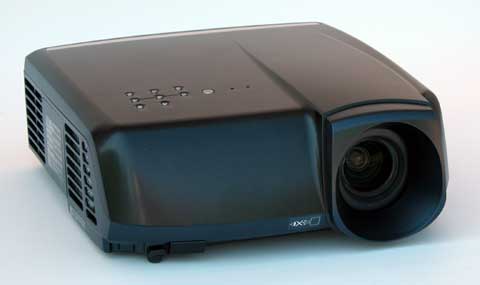
To look at the XD520U, you could be mistaken for thinking it was a slightly under-designed home theatre projector, rather than a business projector. While most business projectors opt for no-nonsense plain styling — presumably because the bean counters won't approve a projector that looks in any way interesting — the XD520U is decked out in white plastic, giving it something of an iPod feeling. Mitsubishi Electric denotes the XD520U as a portable projector, but with dimensions of 332x102x250mm and a carrying weight of 2.9kg, you wouldn't want to have to lug it around too much.

Keeping portability in mind, the XD520U comes with a carrying bag large enough to accommodate the projector, its remote control and connection cables. As projector bags go it's not the thickest we've ever seen, and we can imagine it degrading over time, but as an included extra, it's not too bad.

The remote for the XD520U is a basic affair that cements this projector's status as a boardroom tool. A basic VGA and composite cable is provided, along with a thick multi-lingual safety manual; the product manual is supplied as PDF on CD-ROM.

The AU$2199 XD520U DLP Projector sits at the top end of Mitsubishi Electric's new "Leo" range of DLP business projectors. If your budget is tight, the range also includes the AU$1899 XD510U and AU$1599 XD500U, although you'll take a hit in lamp brightness and lamp life respectively.

For those who hate noisy projectors, it's worth noting that the cheaper XD500U dimmer bulb gives it an average claimed noise rating of 26dBA, compared to the XD520U's 29dBA. On the specifications front, the XD520U claims 3000 ANSI lumens brightness, a contrast ratio of 2000:1 and a lamp capable of running at up to 280W. Resolution tops out at 1024x768. As you'd expect for a lower-cost projector, both focus and zoom are manual affairs.

Inputs are functional, with 2 D-Sub connectors, 1 composite and 1 S-Video connector, along with 1 RCA Audio and one 3.5mm stereo input. There's also a single D-Sub output port, and another 3.5mm output audio jack.

The XD520U utilises a six-colour wheel for -- so Mitsubishi claims -- enhanced colour accuracy. For those interested, the two additional colours are yellow and cyan. The bulb on the XD520U is rated for 3000 hours operation in economy mode, or a more sedate 2000 hours in standard mode.

Setting up the XD520U was particularly easy, with a single pop-out front leg for basic angle adjustment. Focus and zoom are handled from the physical front wheels, which feel moderately sturdy.

Verdict
We tested the XD520U with a variety of material and across all of its input sources &mdahs; although with a unit with this few inputs, that's not a difficult task. Calibrating and testing with DisplayMate Multimedia Edition showed good onscreen geometry but a very slight tendency to wash colours out at the lighter end of the spectrum. That's less likely to be a concern for a projector showing static slides, but if you do require the use of embedded video, you might find it a little more noticeable.

Speaking of things you'll find noticeable, the 29dBA output of the fans on the projector are certainly not the most circumspect of critters. Loud, in other words, and for some of our test material that included sound, often nearly as loud as the XD520U's inbuilt and undeniably tinny speakers.

The XD520U's unremarkably remote worked well. Replacement bulbs cost $549 each, which works out at 27.45c/hour in standard mode, or 18.3c/hour if you can get by in economy mode.

The XD520U isn't a stunning system, and it's priced accordingly; while it's possible to get cheaper business projectors with essentially the same raw specifications, many of those do suffer more than the XD520U when it comes to absolute colour precision. At the same time, many other units aren't quite so noisy.

Connections

* Composite
* Yes

* S-Video
* Yes

* DVI
* Yes

* VGA
* Yes

Display

* Screen resolution
* 1024 x 768 pixels

* Mininum projection size - Diagonal
* 1016 mm

* Maximum projection size - Diagonal
* 7620 mm

General

* Dimensions (H x W x D)
* 102 x 332 x 250 mm

* Weight
* 2.9 kg

Image

* Aspect ratio
* 4:3

Lamp

* Lamp brightness
* 3000 cd/m2

Projectors

* Projector system
* DLP

Sound

* Noise level
* 29 dB

* Speakers
* Yes
[+/-] Read moore...

Thursday, August 21, 2008

Mitsubishi HC5500


by Evan Powell

Price as reviewed $2,495

Specifications

ANSI lumens: 1200

Contrast (full on/off): 14,000:1

Light Engine: 1920x1080, native 16:9, 0.74" three-panel inorganic LCD, Micro Lens, with 160W UHP lamp.

Video Compatibility: 1080p/60/50/24, 1080i, 720p, 576p, 576i, 480p, 480i.

Data Compatibility: Computer resolutions up to UXGA 1600x1200

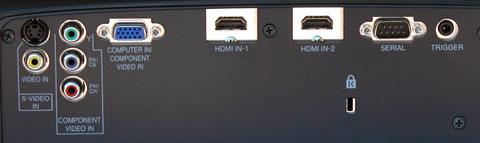
Connection Panel: Two HDMI v. 1.3, one 15-pin VGA, one 3-RCA component input, one s-video, one composite, one 12V trigger, one 9-pin DSub serial port.

Lens and Throw Distance: 1.2:1 power zoom/focus lens with vertical powered lens shift. Throws a 120" diagonal 16:9 image from 12.5 to 15.25 feet

Lamp Life: 2,000 hours, 5,000 hours in eco-mode

Replacement lamp cost: $459 retail

Warranty: Two years. Lamp warranty One Year or 500 hours, whichever comes first.

HC5500 vs. HC4900

Though the HC5500 will replace the HC4900 as Mitsubishi's least expensive 1080p model, it offers a variety of features found on more expensive home theater projectors. Key improvements in the HC5500 over the HC4900 are the following:

• Higher contrast. The HC4900 was rated at 7500:1, and the HC5500 is rated at 14,000:1. In viewing this two units side by side, the HC5500 has an obvious edge in contrast, and an even more obvious advantage in black levels.

• Higher brightness. The HC4900 was rated at 1000 ANSI lumens maximum, and the HC5500 is rated at 1200.

• Much faster auto iris. On the HC4900, with a shift in scenes from bright to dark it would take the auto iris a second or two to adjust to the maximum black level. On the HC5500, the iris adjustment happens so quickly that it is invisible.

• HDMI inputs. The DVI port on the HC4900 has been converted to a second HDMI input. Thus, there are two HDMI 1.3 inputs on the HC5500, whereas there was just one HDMI 1.2 input on the HC4900.

• Improved video processing. The Pixelworks processor on the HC4900 has been upgraded to the Silicon Optics HQV chip.

• 1080p/24. The 4900 did not have 1080p/24 capability, and the HC5500 does.

• Anamorphic lens compatibility. The HC5500 has a versatile scaling package that allows the user to install an anamorphic lens and leave it permanently in place no matter what aspect ratio the subject matter is in. This saves the cost of a motorized track, which can be substantial, or it eliminates the need to manually move the lens when one switches from 2.35 to non-2.35 material. Either way, it provides a friendlier solution for those interested in super-widescreen 2.35 installations.

• Digital keystone correction. A +/- 15 degrees vertical keystone correction capability has been added to the HC5500 that did not exist on the HC4900.

• Fan noise. The HC5500 is purported to be a bit quieter than the HC4900. It might be--we can't tell because the HC4900 was already stone quiet, so we don't notice any difference. These are two of the quietest home theater projectors on the market.

Limitations

The HC5500 has one noteworthy reduction in functionality as compared to its predecessor: the zoom range on the lens has been reduced from 1.6x to 1.2x, and the vertical lens shift range has been reduced from 2.5 picture heights to 2.0 picture heights. Horizontal lens shift, which had a modest range of 5% of the picture width on the HC4900, has been eliminated on the new model.

The new zoom lens and lens shift ranges introduce some restrictions on how and where you can install the HC5500. As is typical, with the lens in neutral position, the centerline of the lens intersects the center of the projected image. From that point you can use vertical lens shift to raise or lower the picture a maximum of 50% of the picture height. That means you can place the image entirely above or below the centerline of the lens, but without any additional clearance. This is great for mounting the projector on a rear shelf or on a bookcase or stand directly behind the seats. On the other hand, for a ceiling mount you may need to use a drop extension tube to avoid tilting the projector to hit the screen.

The short zoom range means that the projector will almost always be placed immediately behind the seats if it is not ceiling mounted. If, for example, you want to install a 120" 16:9 screen, you will need to place the HC5500 at least 12.5' and no more than about 15.25' from the screen. The HC4900 had the same minimum throw distance of 12.5 feet for this screen size, but it could be set back almost 20 feet if your room dimensions required it.

The HC5500's short zoom range means that the projector will be placed at a distance of between 1.4 and 1.7 times the screen width. Since many people prefer to sit at this viewing range, or perhaps just a bit closer, the projector will most likely end up immediately behind the seats in many installations. Thankfully, the projector is so quiet you'll never know it's there. As always, before you place an order, take care to measure out your room dimensions and screen size to ensure that the projector's geometry will fit your intended installation plan.

Performance Notes

Lumen readings. In its video optimized configuration with lens at its widest angle, gamma mode set to Cinema and color temperature on Warm, we measured our HC5500 test unit at 610 ANSI lumens, compared to 560 on the HC4900. Thus, on our test units we measure an incremental boost in brightness of about 9%.

Low Lamp mode reduces light output in all operating modes by 26%, and improves lamp life from 2000 to 5000 hours. Since the replacement lamp is $459, users who put a lot of hours on their projectors will find the ability to stretch life out to 5000 hours a desirable option.

Since the zoom lens is only 1.2x, the change in lumen output between its wide angle and telephoto setting is inconsequential. Moving from wide angle to telephoto reduces lumen output by about 5%.

ANSI contrast measured 260:1, which is consistent with what we have been measuring for other LCD projectors in the 1080p performance class.

Conclusion

Last December, we gave the HC4900 our Editor's Choice Award for outstanding value in 1080p projection. Now, just seven months later, the HC5500 represents a substantial improvement in image quality over its predecessor. It is not selling below $2,000 like the HC4900 was, but it is still aggressively priced at an estimated street of $2,495. Higher contrast, deeper blacks, upgraded video processing, 1080p/24 compatibility, and a much faster auto iris combine to make the HC5500 a significant step forward in 1080p projection at this price level. We will wait to see how the market develops in 1080p projection before designating this year's Editor's Choice Awards, but the HC5500 must be considered as a strong contender no matter what happens.

Beyond the improved image quality, the flexible scaling to accommodate a permanently deployed anamorphic lens makes the HC5500 a very attractive option for those looking for a cost-effective 2.35 Cinemascope installation. Thus far, this feature has been seen only on 1080p models that are much higher in price. For more information about 2.35 widescreen installation and whether it is right for you, read this article.

Mitsubishi continues to make competitive inroads into the hot 1080p home theater market with its evolving line of 1080p models that are all outstanding value propositions. As with the HC4900 and HC5000 before it, the HC5500 is highly recommended.

[+/-] Read moore...

Friday, August 15, 2008

Mitsubishi MiniMits XD80U


by Rich Malloy
Price as Reviewed: $1,995.00

Not long ago Mitsubishi turned heads with its amazing one-pound Pocket Projector, but that was more of a novelty than a real business tool. Now the new MiniMits XD80U has arrived, and it’s the smallest, lightest, and least expensive full-fledged projector the company has offered yet.


To be sure, the XD80U is quite compact, not much larger than a best-selling hardcover book. The main design element is what looks like a large lens cap projecting from the front panel. By moving a small lever, the top part of the lens cap rotates out of the way. The result is a fairly sturdy solution that cannot be lost.

The remote control is quite small, about the size of a short stack of credit cards. Yet despite this petite profile, the buttons are well placed and easy to push. The bad news is that the most important buttons for presenters—those for advancing a PowerPoint slide show and for activating a laser pointer—are missing.

One perennial knock against DLP projectors is that despite their small size and superior contrast, they do not handle colors well. This model fights this shortcoming by including two color modes: one for business presentations where white might be a dominant color, and a second mode designed to generate more vivid colors for showing DVD movies. In our tests, that second color mode provided a smoother palette for entertainment applications. Unfortunately, the loud fan on the XD80U would cause real problems for any serious cinema fan.

In addition to its intricate lens cap mechanism, the XD80U offers automatic keystone correction. This feature lets the projector immediately sense its vertical elevation angle and automatically apply a digital modification to the image, essentially turning a trapezoidal slide on the wall into a nice rectangular one. Our test unit came with three AC cables: a six-foot three-prong cable for the U.S. and two for Europe. The only other cable was for a VGA connection. When it comes to audio and other video cables, you have to supply your own.

The XD80U performed fairly well when compared with other projectors in its weight class. We measured its brightness at 1372 lumens, almost 10 percent below the advertised value of 1500, but its low-power mode was comparatively bright at 1180 lumens, only 14 percent dimmer than Normal mode. Using our checkerboard contrast test, we saw a contrast ratio of 478:1, one of the lowest in this category. Generally, however, we found the images to be sharp and steady.

The Mitsubishi is fairly fast on its feet. It was ready for action in only 19 seconds. Cooling required 1 minute and 32 seconds, but like a few other new projectors, the XD80U has a quick shut-down feature. Just pull the plug and a small internal battery will continue to cool the projector down. Even in low-power mode, however, that cooling fan was distracting.

Operating costs for the Mitsubishi MiniMits XD80U are a bit expensive. The lamp needs to be replaced after only 1,500 hours, and replacement lamps will set you back $495. This yields a usage cost of 33 cents an hour—one of the highest we’ve seen. Individual support can be obtained by e-mail or by a toll-free telephone number, but only during business hours.

The best features of the Mitsubishi XD80U are its image quality (including the innovative dual color modes) and its long warranty. Unfortunately, these benefits are offset by a noisy fan that can drown out DVDs. The XD80U is a good ultraportable projector, but the Dell 3400MP, which is lighter, brighter, less expensive, and offers more features, is still our top pick in this class.

[+/-] Read moore...

Monday, August 11, 2008

Mitsubishi Pocket Projector PK20

by Rich Malloy
Price as Reviewed: $899.00

A year ago, Mitsubishi invented this product category with its PK10. Now, in its second foray into this market, the Japanese giant has created a model that is practically identical to the Boxlight Bumblebee in terms of features, performance, and general design. The only real difference we see with the Mitsubishi Pocket Projector PK20 is that it comes with a screw-on tripod mount. This unusual feature may be necessary because like the Bumblebee, the PK20 does not elevate its image and therefore must be propped up to display a presentation in full view.

As with the Bumblebee, the PK20’s small carrying pouch is much too small to accommodate any of the needed cables, let alone the AC adapter. Also, there is no VGA cable for connecting to a laptop. For laptop-less operation, the PK20 relies on an SD Card slot. To use it, you must save your PowerPoint slideshow to an SD Card as a series of JPEG image files. We encountered similar problems with the PK20 as we did with the Bumblebee: The projector had trouble recognizing that an SD Card was present and was unable to show certain video files.

Our test unit did not come with a battery, so we could not measure performance with this accessory. An accessory we were provided with, however, was the same ill-conceived remote control that accompanied the Bumblebee. Again, the labels were impossible to read, the buttons hard to push, and the functionality just this side of useless. And on that rare occasion when you do have to use it, you must carefully aim the remote at the projector’s single infrared receiver on its back panel.

Mitsubishi deserves credit for being honest about this projector’s brightness, or lack thereof. In our performance tests, the PK20 produced only 23 lumens in its standard power mode; this is almost two orders of magnitude lower than many new AC-powered projectors, but surprisingly close to Mitsubishi’s claim of 25 lumens. The PK20 has a high-power mode, which increases the brightness by 20 percent and bumps up the fan noise considerably.

As with the Bumblebee, the PK20’s SD Card slot enables digital photographers to show off their work in darkened rooms. The Mitsubishi Pocket Projector PK20 is an improvement on the company’s early battery-powered models, but we’d rather wait for the next version.

[+/-] Read moore...