Showing posts with label More 2000 Lumens. Show all posts

Monday, September 8, 2008

Toshiba TDP-XP1U


by Rich Malloy
Price as Reviewed $555.00 - $779.00

Toshiba’s TDP-XP1U looks rather pedestrian. And why shouldn’t it? With a suggested list price of only $779, it is clearly a budget model. The good news is that this value-priced projector is bright, boasts XGA resolution, and generates sharp and steady images.

At 4.8 pounds, the TDP-XP1U is not featherweight, yet it remains easily portable. And its easy-to-use features are limited to recognizing the current input (video or computer) automatically and adjusting accordingly.

The array of connectors on the back panel is rather sumptuous by bargain-projector standards. In addition to the standard input ports (VGA, S-Video, composite video, and mini audio), there are also output ports for a second display (useful for desktop users) and audio. There’s even an old-fashioned serial port.

The worst feature of the TDP-XP1U is its remote control, a tiny credit card–size device whose membrane-style keys had to be pressed repeatedly in order to get any response. Fortunately, only one key is highly useful (the On button) and that is repeated in a much more responsive way on the top panel of the projector.

On our lab tests, the TDP-XP1U performed quite well. It was the brightest XGA budget model we have tested, scoring 2155 lumens—almost 3 lumens per dollar. Other numbers were not so complimentary, however. Its contrast ratio was acceptable at 322:1. Its image size (37 inches diagonal at a 60-inch distance) was one of the smallest we have seen in recent months. Its warm-up and cooldown times were decidedly leisurely, particularly the latter at no less than 2 minutes.

The TDP-XP1U did much better in our qualitative tests, though, where it displayed very sharp and steady images. (Its main ease-of-use feature may be its ability to be easy on the eyes.) We were particularly impressed by its ability to resolve very dark and light grays. And, best of all, we appreciated its exceptionally quiet cooling fan. Indeed, in low-power mode, we could hardly hear it.

With an outlay of only $779, you can’t go wrong with the Toshiba TDP-XP1U. But consider that you will probably want to throw away the remote and replace it with a $60 laser pointer.

[+/-] Read moore...

NEC NP41


by Rich Malloy
Price as Reviewed $999

In contrast to the sleek Casio XJ-S57, the new NEC NP41 is a white, utilitarian box. There’s no fancy lens cap here; an ordinary translucent plastic disk pops onto the lens aperture the way such items have always done. And, at 3.6 pounds, this model is the lightest projector in this roundup, but certainly not the lightest we have seen recently.

The connectors on the projector’s rear panel cover just the bare minimum: VGA (which doubles as the component video input with an optional cable), S-Video, composite video, and a mini audio socket. There is also a PS2-style round “control” port.

Although relatively large, the remote control has only a few useful controls. These include the somewhat standard but infrequently used digital-zoom buttons.

The best part of this projector is something that is missing: a focus ring around the lens. The reason? The focusing is done automatically and rather skillfully by the projector itself. The projector also automatically compensates for any trapezoidal or keystone image effects, but because such compensation usually degrades image quality, we turned this feature off via NP41’s on-screen menu.

On our tests, this projector scored quite well. Its brightness of 2210 lumens was just a tad shy of the advertised mark of 2300. In our checkerboard contrast test—a more realistic analysis than the industry-standard full-on/full-off test—the NEC scored a ratio of 534:1, which is one of the higher marks we have seen, and the highest in this roundup.

We really appreciated the speedy warm-up and cooldown times, the latter being an impressively short 14 seconds. Subjectively, we like the color capabilities, especially some nice bright yellows, which is rare for DLP projectors. The cooling fan was a bit noisy, however, even in low-power Eco mode.

With a price tag of $999, including a two-year warranty, the NEC NP41 is one of the lower-priced XGA projectors capable of more than 2000 lumens of brightness. Add in the automatic focusing feature, and it becomes a real bargain.

[+/-] Read moore...

Saturday, September 6, 2008

NEC NP50


Price as Reviewed $1,181.57 - $1,191.99

It's easy to save time and money on presentations with NEC's NP50 multimedia projector. Almost fully automatic, this projector starts up, focuses, corrects keystone, and shuts down on its own. All you really have to do is plug it in and get down to business. The eye-catching design, small footprint, and light weight of the NP50 is complemented by its incredible functionality. The NP50 also comes with integrated features to improve color accuracy, white/black levels, provide wall color correction for projection on non-white surfaces, image magnification, and lamp protection with direct power off.

Dimensions (HxWxD) 246 x 72 x 177 mm
Weight 1.6 kg
Projection technology DLP
Contrast Ratio 1600 : 1
Max. resolution 1024 x 768
Brightness (lumens) 2600 ANSI lumens
Projection distance 1.4 to 13.4m
Projection image size 33- to 300-inch
Aspect Ratio 4:3
Estimated lamp life 3000 hours

[+/-] Read moore...

Friday, September 5, 2008

Epson EMP 765


By Brian Nadel
Price as Reviewed £ 1649

Packed with features and able to blast more than 2,000 lumens of light in a large conference room, the Epson EMP 765 is worth the money if you want big projector power in a small package...

It's far from the lightest or smallest business projector on the market, but the Epson EMP 765 squeezes the abilities of a conference-room projector into a remarkably portable case. With more than 2,000 lumens of light, it's bright enough for a lights-on presentation or a digital classroom lesson, and it's packed with features, including wireless networking, the ability to run a show from a memory card and LAN management for IT administrators. The 765's £1,649 (ex. VAT) price tag is a bit steep, but it's worth it if you need the power of a large projector in a small package.

Built around three 0.7-inch LCD panels, the silver-and-grey Epson EMP 765 has an XGA native resolution and weighs a light 1.8kg. Its 27.6cm by 19.3cm by 7cm dimensions are typical for the portable-projector class, and with the included padded case, remote control and key cables, the 765 hits the road at a total weight of 3.2kg. The Epson EMP 765 can fill a screen as large as 12.1m and can project a surprisingly big image from a short distance away; we filled a 30in. screen from just a metre away. We really like the automatic keystone correction, which displays a perfectly square image regardless of the angle you're projecting from. With the ability to support both 4:3 (the PC standard) and 16:9 (the DVD standard) pixel arrangements, the 765 can handle standard and high-definition video formats.

Although it lacks an HDMI connector, the Epson EMP 765 is a well-connected projector. It features both USB A and USB B ports, so you can plug in a notebook or pull images and video from a camera, a flash key or an external drive. There are also ports for VGA, audio, S-Video and composite video.

The Epson EMP 765's control panel is on top of the projector, and the buttons are large and intuitive. There are dedicated controls for manual keystone correction, volume and menu navigation, as well as status lights for lamp life and overheating. Atop the projector are controls for manually adjusting the focus and zooming up to 1.2X -- both easy adjustments, thanks to protruding knobs. The included remote lets you adjust volume, input selection and digital zoom, among other things; however, it lacks a laser pointer.

It's the 765's Type I/II PC Card slot that sets it apart from the crowd. You can use it with the included Wi-Fi card to monitor the projector over a LAN or to show images stored on a network drive or a nearby notebook -- no Ethernet cables needed. The downside is that before displaying slides or digital images over the network, you first need to convert them with Epson's EMP SlideMaker 2. In our tests, the projector worked like a charm with a variety of flash cards and USB memory drives but balked at a 2GB PC Card hard drive. When connected to a network, you can take advantage of the 765's EMP Monitor software, which can change the image source, make minor image adjustments from afar, and even send email when the lamp burns out or is in danger of overheating.

Make no mistake: with the ability to deliver 2,148 lumens of light in Presentation mode, the 765 is among the brightest projectors in the portable XGA class, although it's slightly off Epson's advertised 2,500 lumen rating. Theatre mode reduces the brightness level by 25 percent; the low-brightness setting delivers 1,616 lumens, which is the equivalent output of the BenQ PB6110 at its high-brightness setting. With all this brightness comes a downside, however: when maxed out, the 765's fan is among the loudest we've encountered, even if it's not quite overwhelming. The low-brightness setting reduces the noise to an acceptable level. The Epson EMP 765 has an average brightness uniformity of 75 percent, although we noticed a hot spot in the centre. Unfortunately, the projector's colour temperature shifts from one side to the other, giving the image a pink cast on the right and a blue one on the left.

Like those of other LCD projectors, the Epson EMP 765's measured 204:1 contrast ratio can't match the 500:1 ratio that's common on DLP projectors today. On the plus side, its images were rock solid, without any ghosting and with only occasional flicker. It displayed some of the sharpest type and images we've seen, making it great for text-heavy presentations.

Firing up the Epson EMP 765 and putting an image on-screen takes only 23 seconds -- just long enough to make sure your notebook is powered up and connected. The 765 shuts down, cools off and is ready to be packed up in a miraculous 4 seconds. Most projectors, such as the Hitachi Performa CP-RS55, take more than a minute.

Maintenance for the Epson EMP 765 is easy: we love the pull-out air filter and the ability to quickly cool down the 170-watt lamp and change it with a screwdriver. Bulbs are rated for 3,000 hours in low-brightness mode, which is about 500 more hours than we typically see, but replacements cost a princely £349 (ex. VAT) each.

Epson's on-site warranty for the EMP 765 covers parts and labour for three years. Epson's Web site features troubleshooting advice, software downloads, detailed FAQs and manuals. If you need personal attention, you can use the dedicated email link, chat online with an Epson support expert or talk to a tech-support representative by phone. Epson's support line, which is charged at national rate, is open on weekdays between 9am and 5.30pm (9am to 6pm on Saturdays and 10am to 5pm on Sundays).

[+/-] Read moore...

Monday, August 18, 2008

Optoma HD81-LV


By Kevin Miller
Price as reviewed $6,524

The competition among higher-end front projectors has hit fever pitch recently, partly because DLP has finally caught up to LCD and LCoS in delivering 1080p native resolution. Enter Optoma's flagship 1080p resolution DLP projector, the HD81-LV. This is one of the many projectors that actually deliver every line of resolution in a 1080p source. On the downside, we've found that its best picture quality can only be achieved in smaller screen sizes, and furthermore it was quite difficult to set up correctly. If properly calibrated, however, the Optoma HD81-LV is capable of good overall performance, and its relatively low street price compared with other 1080p units makes up for some of its faults.

Design

The design of the HD81-LV itself is rather basic. It does have a small footprint, which means it will hide away on most ceilings without bringing any attention to itself. Our review sample was finished in a gun-metal with sparkles on the top of the chassis, while the rest of the unit was a solid dark gray. Following in the vein of the ultra-high end, the HD81-LV is packaged with an outboard video processor that acts as a video source selector as well. It has an all-black finish, with the exception of a small amount of silver trim out by the sides of the unit. The HD81-LV projector measures 411 x 311 x 116mm and weighs 4.5kg, while the outboard processor measures 433 x 285 x 50mm and weighs 4.2kg.

Optoma's remote control is relatively small with seemingly a zillion keys, all of which were undersized and less comfortable than we preferred. Once you hit any key, the remote becomes fully backlit, which does help with setup in a dark environment, and we appreciated the direct access keys for most of the important functions. The projector sports a vertically arrayed GUI or menu system, which is fairly easy and intuitive to navigate.

Features

As a 1080p native resolution projector, the Optoma HD81-LV can deliver every last detail from 1080i and 1080p sources. Higher native resolution is especially important in a projector because the large screen size can really show off the extra detail. Like all somewhat affordable 1080p DLP units, the HD81-LV has a single DLP chip and uses the bulb-and-color-wheel arrangement, as opposed to the megabuck three-chip DLP models and LCoS and LCD projectors.

Optoma throws in a plethora of picture-affecting features on the HD81-LV, most of which are dubious or downright harmful to picture quality. Features to avoid using or turning on include: Brilliant Color, Color Vividness, B/W extension, and Auto Gamma. One noticeably absent setup feature is vertical lens shift, an unfortunate omission for installers because it makes placement on the ceiling relative to the screen a bit easier. Vertical lens shift is found on every other DLP and LCD-based projector at or near the price point of the HD81-LV.

Useful features include three preset selectable color temperatures in addition to a fourth, User setting, that's adjustable. Picture modes include: User 1, 2, 3, and ISF Day and Night modes. There is no mention of how to create and/or access the ISF Day and Night modes in the manual. We assume, if it is like other displays, that it must be implemented by an installer via the serial control port. Ten gamma setting choices give the user way too many ways to get this wrong. We found -5 to be the best, most CRT-like gamma curve. In the System Menu, under Projector, there's an Iris setting. This gives you the choice of Auto (which we don't recommend as it changes white and black depending on the content of the picture), Off, and On, with 16 setting choices.

The HD81-LV also offers an anamorphic lens solution for ultra-wide 2.35:1 aspect screen applications. It is available as either a fixed lens solution or a motorized movable lens assembly that attaches to the projector chassis.

Connectivity on the HD81-LV is quite generous, although more elaborate than most projectors because of the external processor box. On the rear are three HDMI inputs, two component-videos, two industrial-grade RGBHV components, two S-video, two composites and a serial control port. There is a control port that connects to the beamer for communication. Unusual for a front projection system are the front panel inputs on the processor: An S-video, composite, and analog PC input are all housed beneath a flip-down door on the front.

Optoma includes a serial cable and an HDMI cable, both 2m long, to run between the box and the projector, but you'll have to supply your own cables if you want more separation between the two. The HD81-LV can also incorporate A/V receivers (with or without HDMI connectivity), so you can have the box switch video and the receiver handle audio processing properly.

Performance

The Optoma HD81-LV's picture quality had its good and bad points, but it's not among the top tier of full-HD models we've tested. Color fidelity, if the picture is adjusted correctly, can be quite good overall. Unfortunately, when the projector is asked to fill a large screen, its grayscale goes into the toilet, causing discoloration in bright scenes and blacks to brighten significantly. Therefore, we recommend that it be paired with small screens not exceeding 92 inches diagonal, depending on the screen material. The HD81-LV's lack of vertical lens shift is a negative, but diligence in the installation can make up for that.

The initial picture quality of the Optoma HD81-LV left a lot to be desired, but that's to be expected. During setup, we discovered the unfortunate truth that the HD81-LV was not capable of producing bright pictures if you want them to be accurate. Even with the Iris off and contrast toned down, grayscale tracking and gamma suffered badly, and blacks were way too bright. With the Iris all the way up to 16, blacks looked much better, but light output was unacceptably low. We settled on a compromise with the Iris set in the middle of the range at 8. This yielded a relatively linear grayscale without much color shift, and a barely acceptable 9 footlamberts of light output on a 2m wide Stewart Grayhawk RS screen.

After a thorough ISF-style calibration, we found blacks and grayscale tracking acceptable, but certainly not exceptional, compared with other 1080p projectors. On the other hand, primary colors, although by no means perfect, were more accurate than those of most of the competition. Color decoding was accurate for both SD and HD material, as long as Color Space was set to Auto.

We watched mainly Blu-rays with our Samsung BD-P1200 set to output 1080p. Chapter 2 of Casino Royale is a very bright, fast-moving scene. This scene was rendered cleanly and smoothly thanks to clean video processing, and there was plenty of snap and pop, indicating solid contrast ratio. Chapter 7, the scene at Miami airport, has a combination of bright, colorful, and dark material all in the space of a few minutes. Shadow detail in the darker parts of this scene was relatively good, especially considering the Iris was set to 8 in the middle of the range.

Another awesome transfer on Blu-ray is The Departed and Chapter 2 is a good scene for detail and color saturation. The detail on the uniforms, along with the clock and text on the test paper, looked impressive indeed on the HD81-LV. The HD81-LV is also one of the only projectors in its class to fully resolve a 1080p resolution test pattern with no loss whatsoever. Most of the competition rolls off some of the resolution, which means you don't get all the detail. This is one of the HD81-LV's strong points.

[+/-] Read moore...

Friday, August 15, 2008

HP MP3320


by James Stevenson
Price as Reviewed: $1,399.00

Getting the 3.8 pound MP3320 set up was an absolute breeze thanks to the intuitive on-screen menu system. The measured brightness of 2248 lumens was a little under the rated 2400, but that measurement was good enough for second-best in our roundup. The 242:1 contrast ratio was only third best, but the MP3320 handled the rainbow effect better than most other DLP projectors we've seen.

Operation wasn't quite as smooth as we would have liked. Oddly, the left and right buttons on the remote are used to move up and down on the menu's different levels instead of the up and down buttons. We also had some trouble using the mouse feature on the remote; the speed seemed to change at will. On the plus side, we liked the zoom feature and easy-to-use manual focus ring. The cool-down time of 17 seconds was also tops in this roundup.

The MP3320's video performance left us a bit cold. When we ran our DVD tests the colors didn't seem right, and the resulting look was faded compared to the other projectors. The audio from the unit was hard to hear, and there wasn't enough sound for even a small room.

It's not the most affordable projector in this roundup, but the HP MP3320 delivers the best balance of performance and portability.

[+/-] Read moore...

Canon REALiS SX80


by Evan Powell
Current Price: $12999

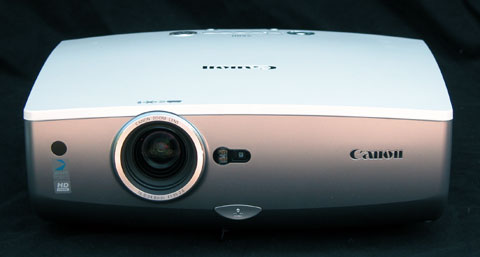
The newly released Canon REALiS SX80 is the latest in the company's long established line of SXGA+ (1400x1050) projectors. These models have always been popular due to a unique combination of factors. Not only are they double the resolution of the standard XGA format, but they deliver high light output, exceptional color accuracy, and a complete lack of visible pixel structure due to the use of LCOS technology.

For those who want high quality display of complex imagery, from text and financial documents to detailed graphics, the Canon SXGA LCOS projectors have been the go-to models for many enthusiastic users. And for photographers, the SX series of projectors have been naturals for displaying photographs in large scale. The new SX80 is the least expensive in Canon's SXGA+ line. It comes in elegant pearl white casework that is a definite improvement in looks over previous models.

Key Specifications

ANSI lumens: 3000

Contrast (full on/off): 900:1

Light Engine: 1400x1050, native 4:3, three-panel LCOS with 230W NSH lamp.

Video Compatibility: 1080p/60, 1080i, 1035i, 720p, 576p, 576i, 480p, 480i.

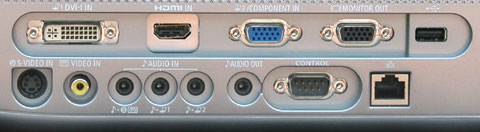
Connection Panel: One HDMI 1.3 port, one DVI-I, one 15-pin VGA, one VGA monitor output, one 3-RCA component input, one s-video, one composite, one 9-pin DSub serial port.

Lens and Throw Distance: 1.5x powered zoom/focus lens with no vertical or horizontal lens shift. Throws a 120" diagonal 4:3 image from 12 to 17.5 feet.

Lamp Life: 2000 hours, 2500 in eco-mode

Replacement lamp price: $579 retail.

Warranty: Three years.

Excellent color accuracy.

The factory preset sRGB mode was almost perfectly calibrated coming out of the box. All we did to tweak it was add +1 to Blue Gain and Offset on the VGA port. At these settings the gray scale tracked almost perfectly at 6500K all the way to 100 IRE.

Brightness.

Many projectors will lose a great deal of their rated light output when set to optimum color performance. Not so the SX80. In the factory preset sRGB mode, and with the lens at the wide angle setting, the SX80 measured a very substantial 2420 ANSI lumens of brightness. At the opposite end of the lens, at maximum telephoto, the projector still measured 2012 ANSI Lumens. Thus, the zoom lens loses only 17% of its full light potential in moving from maximum wide angle to maximum telephoto. This is noteworthy considering the fact that many zoom lenses in the 1.5x range can lose up to 30% or more.

The SX80 has several other factory preset operating modes. Presentation mode is brighter and colder. With the lens in wide angle position it measured 2793 lumens, or very close to the theoretical maximum. Standard mode measured 2376 lumens, and Movie mode was 1863 lumens.

The SX80 has a low lamp mode that will extend lamp life from 2000 to 2500 hours. Since replacement lamps retail at $579, any additional life you can get from the lamp will be welcome. Running with the lamp on Low will reduce lumen output in any operating mode by 23%.

No visible pixelation. One of the key advantages of LCOS technology is the virtual absence of visible pixel structure. You won't see any screendoor effect on the SX80.

Low fan noise.

The industry has been doing a good job of making projectors quieter than they used to be. Nevertheless, since this model can pump out up to 3000 lumens in a relatively small 11.5 lb package, you'd expect some fan noise along with it. To our surprise, the fan noise even with the lamp on full power was remarkably low and unobtrusive, and in low lamp mode the projector was downright quiet.

Good connectivity.

The SX80 offers a variety of inputs including one each of HDMI, DVI-I, VGA, and the conventional array of analog video inputs. There is also one VGA monitor loop-through and three audio inputs (which unfortunately drive a small, tinny-sounding one watt speaker).

Contrast.

The Canon SX80 is rated at a full on/off contrast of 900:1. For readers used to seeing ratings on home theater projectors of 10,000:1 and up, this may seem rather modest. However, though the SX80 does not have the highest contrast in the marketplace, it is not as bad as the specs would suggest. We measured ANSI contrast on the SX80 at a very respectable 244:1, which is about the same readings we are getting on LCD home theater projectors, and is in fact higher than the 209:1 reading we got on the JVC DLA-RS2.

Once we ignore the specs and look at the pictures, we get a different impression. Overall, graphics and photographic images appear bright and dynamic, with sufficient range from black to white to give them plenty of snap. Black levels are not as deep as they are on most home theater models, but they are deep enough to look fully black as compared to dark gray. In a room with ambient light, the overall brightness of the image is the leading factor in producing the vibrancy of the image. Meanwhile, differences between projectors in their respective black levels become moot since the room light determines how black the blacks are actually perceived. So the SX80 will compete extremely well against higher contrast, but lower light output projectors if you have a large screen and some ambient light present.

Weak onboard audio.

If you plan on using audio in your presentations and you are thinking about using the SX80's onboard system, you might want to think again. The single one-watt speaker is thin and tinny, lacking anything remotely close to a bass frequency. Now, to be fair, no projector in this class has great onboard audio. But there are competing SXGA+ products that do have more substantial onboard audio than this one. If audio is an important part of your presentation mix and you really need room-filling sound, either plan to use a separate audio system or choose a different projector.

Movie mode.

The presence of an operating mode called "Movie" might lead users to imagine that it should be used to view movies. We would counsel against it. Compared to the sRGB mode, the Movie mode drops lumen output by 15%, which in and of itself may be a good thing for dark room viewing. But it also lowers ANSI contrast from 244:1 to 206:1, and most importantly it renders a colder, less accurate gray scale to boot. For photography and movies, stick with sRGB. If you need to reduce the lumen output, back the projector up and use the long end of the lens, put it into low lamp mode, and if necessary, use a neutral density filter.

No lens shift.

The SX80 projects a picture such that the centerline of the lens intersects the screen at the bottom edge of the image (or the top edge of the image when the projector is inverted for ceiling mount). This built-in fixed throw angle may present difficulties in some situations. If the projector is on a conference room table, the bottom of the projected image is also at the level of the table, which in many cases may be too low. For ceiling mounting, you may wish to use a drop extension tube to get the picture down the wall a bit and away from the ceiling.

You can always tilt the projector upward, or downward from the ceiling mount, and square up the resulting trapezoid with keystone correction. However, if you do this, you will not get a native 1400x1050 image. Since one of the advantages of this projector is a very sharp image due to its high native resolution, most users will want to avoid any compromise in image sharpness that would be imparted by the introduction of keystone adjustments.

We should note that keystone adjustments have more of an effect on material like text/financial documents than on graphics and photography. But we always like to avoid keystone adjustments whenever possible. In lieu of physical lens shift, which is the ideal solution for adjusting image height on the wall or screen, we would like to have seen a fixed upward throw angle with more of an offset.

Conclusion

The Canon REALiS SX80 fills a unique niche in the marketplace. It offers high resolution, excellent color balance, zero pixelation, and high lumen output, for street prices under $3,000. Its ability to deliver 2400 real color-balanced ANSI lumens in sRGB mode gives it a significant competitive advantage over home theater models that are higher in contrast, but weaker on lumen output. It is ideal for large scale presentation of graphics and photography, or for the clear display of detailed text and financial documents, especially if there is ambient light in the viewing room. If the limitations imposed by the fixed lens and minimal audio capability are not relevant factors in your intended usage, we can strongly recommend the Canon SX80 with genuine enthusiasm.

[+/-] Read moore...

Friday, August 8, 2008

Casio Super Slim XJ-S35

by Rich Malloy
Price as Reviewed: $1,799.00

One of the company’s two new models, the Casio Super Slim XJ-S35 weighs more than all three of the above battery-powered projectors combined. Nevertheless, this four-pound model certainly qualifies as a tiny projector because of its exceptionally low profile. At only 1.7 inches thick, its shape resembles a small notebook computer. This unique form factor should fit easily into almost any laptop carrying case.

In addition to its thinness, the XJ-S35 sports a number of interesting features. Its fold-down lens cap will be difficult to misplace, and most presenters will love the remote-controlled focus and optical zoom capabilities. In fact, the exceptionally large 2X zoom ratio gives presenters tremendous flexibility in where they place the projector. Unfortunately, the remote lacks a laser pointer or any type of mouse emulation. The XJ-S35 does, however, come with a USB input port for laptop-free presentations.

In our performance tests, the Casio pumped out 2091 lumens, actually outshining the advertised value of 2000. Its contrast ratio was 439:1, which while not exceptional for a DLP projector, is more than sufficient for most presentations. The cooling fan is a bit noisy, but the projector features an “Eco” mode, which drops the fan noise considerably and throttles back the brightness by only 25 percent.

The Casio Super Slim XJ-S35 includes a generous three-year warranty. A version without the USB port (XJ-30) sells for $100 less. If you want big-projector power in a sleek design, this is the one to get.

[+/-] Read moore...

ViewSonic PJ258D


by Rich Malloy
Current Price: $549.99 - $1,399.99

Among the hordes of new iPod accessories on the market, perhaps the most intriguing is the $999 ViewSonic PJ258D projector-and it's a pretty powerful one at that. Under its slick, glossy black exterior beats the heart of a business projector that might outshine much of its competition. Although it weighs less than four pounds, the manufacturer claims it can beam out 2000 ANSI lumens, and on our lab test, we saw no fewer than 2265 lumens.

But the PJ258D is focused more on Pirates of the Caribbean than on PowerPoint. Just insert a video iPod into the oversized dock on the projector's top panel and you can start watching your video in a size limited only by the dimensions of your walls. The projector's remote has control buttons that relay directly to the iPod. The process works extremely well, considering there was no laptop or DVD player involved. The only problems we saw were some slight motion artifacts caused no doubt by the iPod.

We watched parts of Pirates of the Caribbean and some of Gone in 60 Seconds. The image was very clear for both movies when blown up on a 60-inch screen, although Johnny Depp's makeup became very noticeable at this size-a testament to the quality of the projector. We never did get to the point where the image was too big to enjoy. At 10 feet, you'll get an 88-inch display, and at 20 feet, the image is more than 8 feet in height, which maxed out our testing facility. You'll want to dim the lights for such a big display, but the image is still plenty bright for movies at that size.

Unfortunately, the PJ258D does not incorporate all of the iPod design philosophy, which focuses not only on visual design but also on the user experience. The projector's control panel is hidden on the rear panel, and its buttons are small and poorly labeled. The all-important power button is particularly hard to find. Obviously, presenters are meant to use the remote control, which includes a prominent power button as well as a handy laser pointer. Business users, however, might bemoan the remote's lack of buttons for controlling a presentation on their laptops. Our advice: Save your PowerPoint slideshows as JPEGs and transfer them to the iPod.

The PJ258D is also surprisingly hot and noisy. After 30 minutes, the right side of the projector was too hot to touch, and the fan noise was too loud for enjoyable viewing. To get the noise down to acceptable levels, we reset the projector to the lowest of its four power settings, which still provided plenty of light (about 1700 lumens). Speaking of noise, we were surprised to find that this movie-oriented projector has only a single one-watt speaker. For most videos, you'll want to connect a pair of small computer speakers.

Despite some flaws, the ViewSonic PJ258D is a groundbreaking entertainment projector that also happens to offer an enviable combination of power, portability, and price. And its three-year warranty (with one year on the lamp) is one of the best in the industry. Still, its rough edges might cause some to wait for the sequel.

[+/-] Read moore...

Thursday, August 7, 2008

Optoma EP727


by Rich Malloy
Current Price: $689.00 - $866.86

Shhh. If you listen carefully, you can hear an entire category of low-resolution SVGA projectors going extinct. Their low-budget niche has been invaded by the amazing Optoma EP727, which boasts XGA resolution, a highly portable design, and a price tag of just $699.

Good Performance and Features for the Price

If that’s not enough, check out the full-featured remote (which includes both a laser pointer and a set of mouse pointer controls) and the relatively wide range of inputs. Not only is there a VGA-out connector for users of obsolete desktops, but there is also a choice of two VGA inputs, using the traditional VGA and the newer DVI connectors (which can be used simultaneously for quick handoffs from one presenter to another). We also like the Velcro straps on the VGA and USB cables for neat and easy stowage.

On our tests, the EP727 presented sharp images and was adequately bright for most applications (1,466 ANSI lumens versus the 2,200 advertised). The contrast ratio was a very impressive 591:1, thanks to its DLP imaging engine. However, like many DLP models, its yellows looked a bit too much like deli mustard. The projector shut down in a sprightly 18 seconds (although it was still warm to the touch) but needed a leisurely 40 seconds to warm up. Even though we had a difficult time doing it, we liked that you can shift EP727 into low-power mode, which for this unit means less noise from the cooling fan and a longer life for the lamp (3,000 hours vs. 2,000 in Bright mode), and a 12 percent decrease in brightness.

A Few Weaknesses

Sure, a couple of aspects of the EP727 could be improved. Although the remote control has an impressive set of features (including numeric keys for inputting a theft-deterring password), most of the buttons are arranged poorly and could easily confuse a nervous presenter. Likewise, the Power button on the top panel of the projector is difficult to identify. Also, the menu structure is a bit more complicated than it needs to be. Finally, the back panel has a surprising omission: an RCA-style video connector, which is usurped by the S-Video connector.

Verdict

The above are minor quibbles, however, especially for a $700 XGA projector that is sure to kill off an entire species of low-resolution budget models. Yes, there are certainly brighter projectors available, but none has the impressive combination of price and features available in the Optoma EP727.

[+/-] Read moore...

Wednesday, August 6, 2008

InFocus IN15


by Rich Malloy
Current Price: $1,169.00 - $1,565.96

The IN15 is remarkably thin at just 1.7 inches. You’ve probably read hardcover books that were thicker. And while this model is pricier than other XGA ultraportable projectors that offer similar brightness, InFocus sweetens the deal with convenient features.

In the case of the IN15, thin doesn’t mean light; while it fits into our ultraportable category, its weight of 3.9 pounds is heavier than the 2.7-pound Dell M209X and the 3.2-pound Optoma TX7155. With all its accoutrements (such as the included AC, VGA, and composite video cables), the weight is closer to 5 pounds.

We can deal with the extra weight given this projector’s surprising number of special features. First there’s the motor-driven optical zoom: Just press a button on the remote and the image zooms to double its size—much larger than the 10 percent increase on almost all other projectors. The IN15 also produced one of the largest images we have seen: 52 inches diagonal at a distance of only 60 inches. Like the optical zoom, focusing is also motor-driven at the touch of a button.

For those who like an absolutely rectangular image, the projector will automatically correct for any keystone or trapezoidal shape problems. We also like the flip-down lens cap that is not only handy but also impossible to lose.

Like most credit-card–size remote controls, the IN15 remote lacks both a laser pointer and any buttons for navigating a PowerPoint slide show. It does, however, have buttons for controlling this model’s motorized focus and optical zoom features. There is also a handy button for switching to low-power Eco mode that drops the noisy cooling fan down to a more tolerable volume while lowering the brightness by only 20 percent.

With such a small size, a few features had to be omitted. These include an S-Video connector, USB port, and an audio speaker. However, speakers on portable projectors are usually so mediocre that it’s a minor loss.

On our lab tests, the IN15 did fairly well. It scored a brightness level of 2271 lumens—below the advertised value but within the traditional industry margin of overstatement. The contrast ratio was good, measuring 488:1. As is typical for DLP-based projectors, the yellow colors had a dull mustard-like look. In general, images seemed a bit fuzzy, caused by significant “comet tails” on individual pixels.

We knocked the older Casio version of this projector for its expensive $499 replacement lamp. The InFocus replacement lamp is a much more reasonable $365 (at www.superwarehouse.com). Too bad the IN15 requires a rather slow 61 seconds to cool down.

The IN15 is an attractively slim and full-featured projector. However, the nearly identical Casio XJ-S46, which costs $100 more, includes a speaker and a USB connector that lets you attach a wireless LAN adapter or run slideshows from a thumb drive without a PC. If you can live without those features, the IN15 is a solid choice for presenters on the go.

[+/-] Read moore...

Dell M209X


by Rich Malloy
Price as Reviewed: $999

With its recently announced M209X, Dell is introducing a new style for its projectors. Where older models were more streamlined with rounded corners and edges, this device features a black, boxy, angular design highlighted with stylish glossy panels. This cigar-box–size model weighs just 2.6 pounds, and at just $999, it not only fits squarely in the ultraportable camp but can also claim membership in the budget category.

A Brighter and More Portable Projector

Intended as an upgrade to Dell’s venerable 3400MP ultraportable, the new M209X outshines it by 500 lumens, with a claimed brightness of 2000 ANSI lumens. It has an HDMI input port and is less expensive at introduction. Dell also claims to have fortified the normally deficient color-handling capabilities of DLP imaging engines with multicolor processing and their new BrilliantColor technology.

Continuing a Dell tradition, the M209X is bundled with a high-quality carrying case and a set of cables equipped with Velcro straps for easy storage. But whereas earlier Dell models included every cable you could ever use, this new model lacks cables for its component video and USB ports.

The M209X’ remote control is fully featured, including the all-important laser pointer and a pair of Page Up/Down buttons. But again, you will need to supply your own USB cable to get those latter buttons to work. This new remote design is very stylish, but that style gets in the way of usability: The button labels are amazingly tiny and printed in an almost unreadable blue color on a black background. Fortunately, the laser button is equipped with a pair of bumps to make it easy to find.

Dell M209X Performance


On our lab tests, the M209X did quite well. Its brightness score of 2125 lumens was refreshingly above its advertised value of 2000. Thanks to its DLP technology, the contrast ratio was equally impressive, at 640:1—although well below the 1800:1 claim. Unfortunately, Dell’s new color-handling technology wasn’t very effective: Yellow shades were still dull and mustard-like, similar to other DLP projectors such as the InFocus IN15.

One nice feature (though we couldn’t test it) was the lamp life. Dell claims that the lamp will last 3,000 hours in standard lamp mode and a startling 5,000 hours in low-power mode. The lamps in most other projectors are rated at 2,000 hours in standard mode, or 3,000 hours in low power. We should also mention the sprightly cooldown time. In default mode, it took a leisurely 1 minute and 32 seconds, but when you switch the projector into Quick Shutdown mode, the cooling fan cuts out in just 11 seconds, and is relatively quiet to boot.

Verdict


Light, bright, and fairly low priced—what’s not to like? Oh, right, the remote control. But you can use the money you’ll save buying the $999 Dell M209X to pick up a nice pointing device and any cords you need. Those looking for a new projector will have a hard time choosing between the Dell M209X and the Optoma TX7155. Both have a similar price tag and features. But, at just 2.6 pounds, the Dell is a bit more portable, shows better contrast, and has a shorter cooldown time (in Quick Shutdown mode). Its long-life lamp and well-cushioned carrying case will have your wallet—and your back—thanking you.

[+/-] Read moore...

Tuesday, August 5, 2008

Sanyo PDG-DSU20N


by Rich Malloy
Price as Reviewed: $499

The $499 Sanyo PDG-DSU20N isn’t some barebones, flimsy device. It’s a slick, well-designed projector that can belt out more than 2000 ANSI lumens. That’s an astonishing 4 lumens per dollar. And Sanyo has even included a small user manual—printed on paper (gasp!).

Spartan, But Functional Design

Of course, this is a budget model, so it has some trade-offs. The connector panel is remarkably sparse, offering just the bare minimum: VGA, composite, S-Video and audio. Also, it’s not exactly an ultraportable model; Sanyo lists its weight as 5.5 pounds, but it tipped our scales at 6.1 pounds. In its full travel configuration with cables and remote, the weight rounds off to 7 pounds—still portable, but your shoulder will notice.

When we first saw the tiny, credit-card–size remote, we sighed; such tiny devices usually get that way by shedding features. But this little remote actually has some useful buttons. First there is an Eco button that lets you quickly switch to low-power mode, quieting down the fan noise and prolonging lamp life. Then there is a pair of Page Up/Down buttons to navigate through PowerPoint presentations. Note that, to get those buttons to work, you’ll have to supply your own USB cable to connect your laptop to the projector. However, the PDG-DSU20N comes with VGA cables.

Sanyo PDG-DSU20N Performance


At 2172 lumens, this budget model was almost 10 percent better on our tests than the advertised 2000 lumens and surprisingly close to the 2500-lumen InFocus IN15, which sells for three times as much. The contrast ratio was also good, at 505:1.

Of course, you can’t expect everything for $500. For example, the SVGA resolution may be too low for some presenters who use high-res graphics. Color accuracy was not noticeably good or bad. And we disliked the design of the control buttons atop the device, where the all-important power button is poorly marked and easy to miss. The same button on the remote control is not well marked, either.

We grew impatient with the leisurely cooldown time: 1 minute 33 seconds for the cooling fan—which was not noticeably noisy—to shut off. And finally, we experienced a strange compatibility problem. For some reason, the Sanyo did not recognize the SVGA signal coming from one of our standard test systems, a Dell Latitude laptop. When we switched to XGA resolution or used a Gateway notebook at SVGA, there was no problem.

Verdict


Can a $500 projector get the job done? Yes, especially when bundled with an amazing three-year warranty. For buyers on a tight budget, the Sanyo PDG-DSU20N is hard to pass up. Just be wary of the compatibility issue we discovered.

[+/-] Read moore...

Optoma TX7155


by Rich Malloy
Current Price: $994.94 - $1,230.80

If you’re looking for a lightweight projector with XGA resolution, the Optoma TX7155 is a good choice. This small, black, and boxy 3.2-pound unit sports pretty impressive specs, including 2500 lumens of brightness for a reasonable $1,100.

The TX7155’s Decent Feature Set

The TX7155 can accommodate not only the traditional assortment of VGA, composite, S-Video and audio connectors but also digital video via an HDMI port. It comes with a relatively standard assortment of cables: AC, VGA, and composite video.

With a full-featured remote control, this Optoma provides not only a laser pointer but also a full set of mouse-control buttons. Unfortunately, the sheer number of buttons may confuse presenters. For example, there are two separate quartets of arrow keys, one for moving the mouse pointer and the other for navigating the on-screen menus. It’s very easy to confuse the two. Also, the Page Up/Down buttons are too small and not well labeled.

Performance


The TX7155 didn’t fare especially well on our lab tests. In its default Presentation mode, the projector registered only 1699 lumens; we had to switch the projector to its Bright mode to pump its score up to 2264 lumens. Although this score follows an industry tradition of being about 10 percent short of its advertised value, it’s still plenty bright for most typical business applications.

Thanks to this model’s DLP imaging engine, we expected a high contrast ratio but saw instead 229:1, one of the lowest scores we have seen for projectors using this technology. On our subjective tests, images were sharp and steady. The projector excelled at resolving very dark grays, but, like most DLP models, the yellow colors were dull and mustard-like. We liked this projector’s quick cooldown time of only 15 seconds. The cooling fan was not noticeably loud.

Optoma TX7155 Verdict


With a street price of $1,100, this ultraportable model includes a very generous three-year warranty that features a one-year warranty on the lamp—four times longer than most other projectors. With this factored in, the price is equivalent to that of the Dell M209X, which has similar performance. The Optoma TX7155, however, is a half-pound heavier and has a lower contrast ratio.

[+/-] Read moore...

NEC NP100


by Rich Malloy
Current Price: $399.95 - $594.99

While it’s not the first sub-$500 projector on the market—a distinction that belongs to the Sanyo PDG-DSU20N--the NEC NP100 may be the most impressive. With strong contrast, plenty of brightness, and a good picture, it’s an excellent budget model for both work and play.

Design

Like the slightly older Sanyo PDG-DSU20N, the NEC NP100 has a slick white design. According to the company, it weighs 5.3 pounds, easily making it the lightest budget model. On our scale, however, it was even lighter, at just 5.1 pounds—a very rare case of a projector weighing less than claimed. The top panel is unique: It’s a recessed cavity just deep enough to accommodate the projector’s credit card–size remote control. But be careful not to lose the remote, as no menu control buttons are on the projector itself.

Performance Tests


On our tests, the NP100 did fairly well. We measured the brightness at 2081 lumens, which is higher than NEC’s claim of 2000 lumens. The contrast ratio was also impressive at 711:1, one of the best we have seen for all projectors and certainly the best for a budget model. On our qualitative tests, the images were quite sharp, with very little flicker or noise. The colors looked good—even the yellow shades that are often such a problem for other models.

NP100 Entertainment


Of course, such a projector is bound to be used for entertainment applications as well as pie charts. The NP100 did quite well in this regard. The native SVGA resolution was not quite high enough to display 1080i HDTV really well, but it was good enough for regular digital TV and DVDs. The cooling-fan sound was a bit noisy during a movie, but you can lower it by switching to Eco mode with barely a noticeable drop in brightness.

A Few Caveats


The NP100’s image size was a bit small, at 36.5 inches diagonal at a 60-inch distance. Uniformity of brightness from the corners of the image to the center was also low, at 60 percent. And the cooldown time was an irritatingly long 2 minutes.

Long Lamp Life


One cost factor often overlooked when buying a projector is the cost of its lamp. NEC prices the NP100’s replacement lamps at $179, one of the lowest prices we’ve seen. The company also rates the lamp at a very long 3,500 hours in regular mode and 4,000 hours in the low-power Eco mode.

NEC NP100 Verdict


If you have a few extra dollars to spend, we would opt for NEC’s more versatile and higher-resolution XGA version of this projector, the NP200, which is still a bargain at $649. However, the NEC NP100 does a good job with typical presentations at an amazingly low price. And with an introductory rebate of $50 (which ends on June 30), it’s also temporarily the least expensive, at an astounding $449.

[+/-] Read moore...